

Contao theme by Avando Labs

One theme.
Every look.
In minutes.

Contao can do anything — except that design starts from scratch with every project: overriding templates, writing CSS, maintaining layout sets, hand-building a theme for every client brand. And anyone who can design but doesn't want to code never gets near the controls.

Avando AVE gives you the power of Contao with the ease of a page builder.

Colours, fonts, spacing, corners, header, cards: all of it settings, live in the front end, without a single line of CSS. But without div soup, without a mammoth framework and without third-party extensions that blow up in your face at the next Contao update.

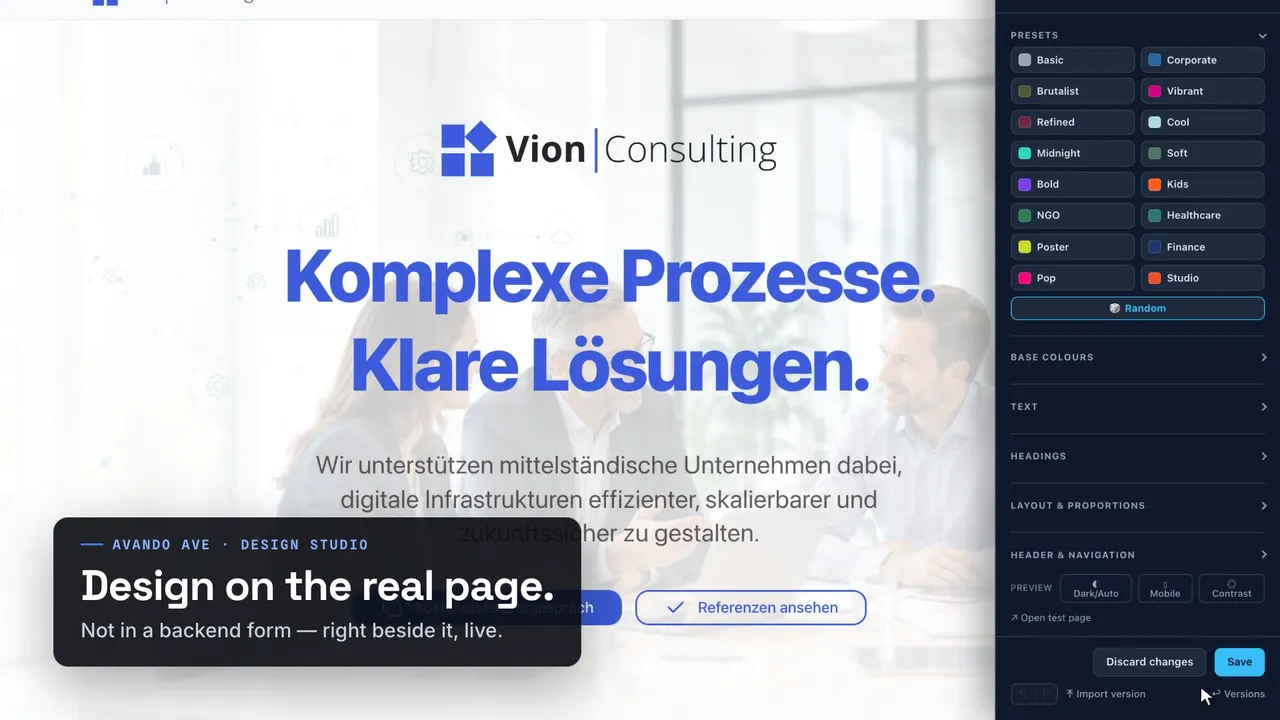
Still from the film: a client site with the Design Studio open Watch the film 1:04

For agencies and freelancers · AI-ready out of the box · 34 KB of CSS in total · no third-party extensions · no build step · fonts served locally

Home page in the “Refined” preset: warm dark surfaces, serif type, muted accents. The same home page in the “Poster” preset: lime header bar, uppercase, hard edges. Poster Refined
Drag. Same Contao installation, same content, same templates — two saved designs.
105
settings in the Design Studio, sorted into nine groups
34 KB
of CSS over the wire in total, gzip — theme, tokens, starter and reset in one file
0
third-party Contao extensions. And 0 build steps in daily work
1
file per design. Download it, take it to the next project

Hands on

Pull four of 105 sliders.
And see how far that goes.

This is not a screenshot. Four sliders are enough for the excerpt on the left — in the Design Studio there are 105, in nine groups. They control real CSS variables of the interface on the right, and that's exactly how the whole theme works: you change a named value, and everything that refers to it follows.

Interactive — go ahead

Primary color#3d7bff
Corner radius1.00×
Density1.00×
Shadow depth1.00×
/* what you're changing right now */
:root {
  --av-color-primary: #3d7bff;
  --av-radius-scale:  1;
  --av-space-scale:   1;
  --av-shadow-scale:  1;
}
HomeServicesWorkContact
Gradient from the primary and the derived secondary colour
Secondary

Card

Border, radius and shadow hang off the same sliders.

Derived

Second card

The secondary colour is created from the primary via oklch() — you don't set it.

A link in body text
Input field

All of this hangs off the four sliders:

ButtonsLinksActive menu itemCard borders GradientsShadowsSpacingSecondary colour Input fieldsBadges

The real Studio adds 100 more settings — header and navigation, dropdowns, footer surfaces, image filters, glass effect, transition duration. And everything takes effect immediately on the real client site.


Why AVE

Avando AVE for developers.
And designers. And everyone else.

The same theme looks different for every role — and takes something different off each one's plate.

For developers

You build the scaffolding once, not per client

No template overrides for every brand, no sprawl of layout sets. One documented set of --av-* tokens, one @layer cascade in which your custom.css always wins. No preprocessor, no bundler, no build in the loop — and every design state is a text file, so it can be diffed and versioned.


For designers

Design with sliders, live on the real site

Brand colour, font, rounding, density, shadow — directly in the front end, with immediate effect on real content. No CSS, no ticket, no waiting for a deploy. And it stays consistent: secondary colour, hover tones and the whole radius ramp derive from what you set.

For editors and clients

Select menus instead of class names

Editors keep building from ordinary Contao building blocks and choose “frame as a card” or “background with overlay” from a list — nothing to memorise, nothing that can break. And the client gets their variants as a link instead of having to imagine them.


Level 1 · The whole website

One panel. Forty values.
The whole site.

01 / 06  ·  Basic

Home page with the theme defaults The same home page, switched to Corporate The same home page, switched to Midnight The same home page, switched to Brutalist The same home page, switched to Poster The same home page, switched to Pop Basic

No template switch, no second layout, no deploy. What changes is a :root { … } block. The six states shown here differ by 33 to 65 --av-* values — forty on average.


The Design Studio

Design is a
matter of settings.
Right in the front end.

When you are logged in as an administrator, a button appears at the bottom right. One click and the drawer slides in — the client site stays visible and usable next to it.

16 presets as a starting pointNot meant as the final state: you take the one that roughly goes in the right direction and fine-tune below it. Brutalist switches to monospace, Midnight turns the surface order dark. 🎲 Random rolls a consistent combination if none fits.

Nine slider groups, when you need themFrom base colours through header, navigation and cards to footer and effects. You don't have to go in there — but when a client wants the brand colour down to the exact hex code, you can.

AI design with your own key“Joinery, down-to-earth, warm wood” → a complete look. Optional and off by default: without a stored key the section is invisible and not a single byte leaves your server. With a key, your provider and your contract apply — the key is stored encrypted and never shown in the form again. “Refine” keeps the brand and fonts and only sharpens the rest.

Undo, versions, export⌘Z applies to the whole design, not just the last slider. Every state can be named, pinned and downloaded as a file — and loaded again in the next project.

Live preview

AI-ready out of the box

The gap between
CMS and AI?
Closed.

There's a gap between the classic CMS and modern AI workflows. Theme logic is buried in template overrides, in-house conventions and page-builder markup. An AI knows none of it, and nobody checks what it changes there.

AVE is built differently: on web standards and named variables. Exactly the language an AI speaks fluently.

CSS variables are the interfaceThe whole look hangs off 254 --av-* tokens with documented defaults. An AI writes a :root block, and the site follows. No template, no PHP, no build step.

Standards instead of home-grown solutionsNative HTML5 such as <details> and <dialog>, Contao's own content elements, @layer, light-dark(), oklch(), plus the values of Open Props. Nothing proprietary that a model would first have to learn.

Few values, complete lookThe browser calculates the secondary colour, hover tones, muted text and dark mode itself. An AI only has to supply a few numbers. Small output means little room for error.

Changes that don't get stuckcustom.css sits outside every layer: it wins without !important and survives every update. What an AI changes is a text file. You can diff it, review it and undo it with a single delete.

/* Prompt: “Joinery, down-to-earth, warm wood” */
:root {
  --av-color-primary:  #8a5a2b;
  --av-color-surface:  light-dark(#f6efe6, #1d1712);
  --av-font-display:   var(--av-font-serif);
  --av-radius-scale:   .4;
  --av-space-scale:    1.05;
}

Five lines, one look. The browser derives the secondary colour, hover tones, dark mode, radius and spacing ramps from them.

  1. cheat-sheet.md

    Every token with its default, every one of the 136 utility classes. The reference for humans and machines.

  2. ai-instructions.md

    The building rules: values from Open Props, native HTML5, no CDNs, the class schema.

  3. tokens.css

    The derivations themselves, readable instead of compiled. An AI can see what follows from what, too.

What this means for you

For agencies

AI workflows without giving up Contao

Your clients stay on an established CMS with safe updates, and your team still works with AI tools. Because AVE relies only on standards, there is no lock-in — neither to a page builder nor to an AI provider. A client design is a short, readable block of variables: easy to hand over, easy to review and quickly switched to a new direction.

For designers

Design in words, results in values

Describe the brand to an AI, and it answers in exactly the terms you think in: primary colour, font, rounding, density, shadow. Instead of nested CSS you get named values that you can read and understand without asking a developer. The derivations keep the look consistent, even when only a handful of values come back.

For developers

An agent that understands the theme before it touches it

Claude Code, Cursor or Copilot find a finite, documented action space in the bundle instead of an empty file. They write into custom.css and Contao's class fields without touching the framework. No build in the loop, every change a diff. That keeps your review just as strict as for code written by humans.

And with the Design Studio? Then you don't even need an editor: you type the brief into the drawer, your provider's AI supplies the values, and the server only lets known sliders with valid values through. The result is a preview first, then a version with its own link. It goes live when you save. Without a key, the AI stays off.


Client approval

Send your clients design proposals
simply as links.

Until now, the design round has cost you either a staging clone you have to maintain, or a screenshot PDF the client can't click. Both go away: you save each direction as a version, and every version has a URL. The client opens it and sees their complete site in this variant — on every page, with real content, without logging in. Nothing changes on the live site.

Example Three directions for the same client — three links from one installation:

Design → save as a version → send the link → wait for approval → restore & save

Nothing ever goes live by accident in between. Rejected directions stay on as versions — in case the client changes their mind.


The must-haves

Legal requirements,
met without the stress.

Accessibility, data protection and now the labelling of AI images: three areas where legal requirements can apply to a website. Since mid-2025 the European Accessibility Act (in Germany: the BFSG) applies to a large share of commercial websites. The most common violation is also the easiest to measure: too little contrast. And it almost always stems from a requirement you're not allowed to change — the client's brand colour.

Checking that by hand is hardly feasible: many pages, light and dark, every colour against its background. The second place where agencies are regularly held liable is even more mundane — a single line of font code that sends every visitor's IP address to a third party. A third one is new: AI images that look real, with no notice saying so.

01 · Contrast per WCAG 2.1

Contrast is measured,
not guessed

The client specifies a brand red. As a surface it looks great. As a link colour on white it reaches 3.1:1 and misses the standard — and nobody notices until someone checks. One click on Contrast in the Design Studio measures the visible text of the open page in the currently active colour scheme, using the real rendered colours instead of the values from the stylesheet.

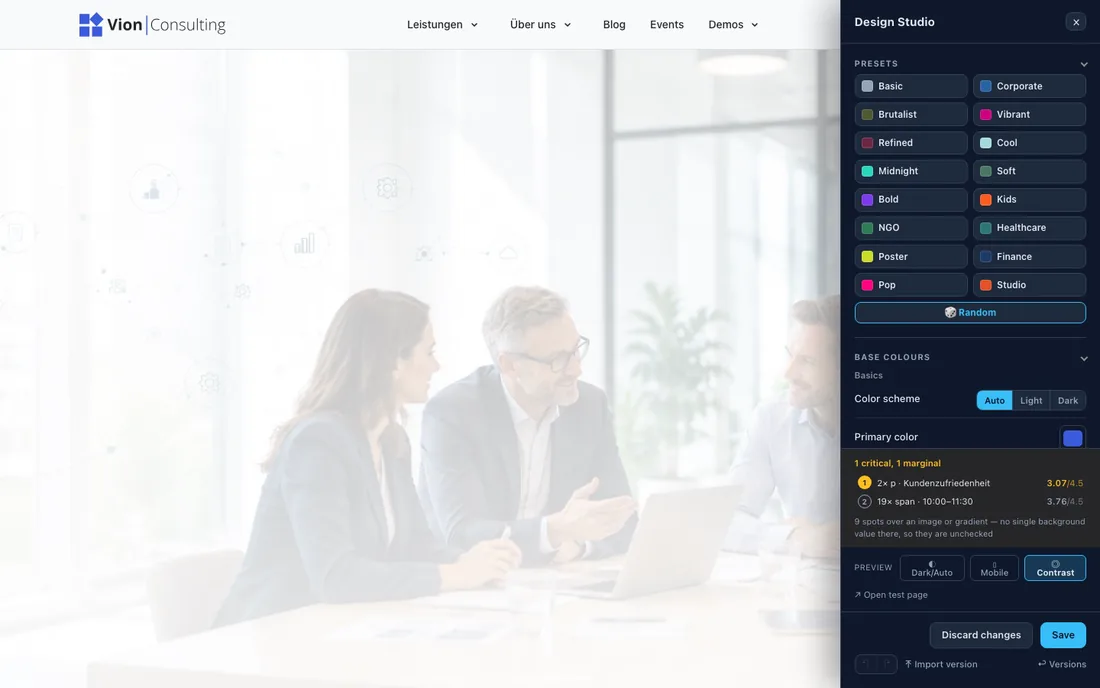
The contrast checker marks text passages directly on the page and lists every finding with its measured contrast value.
Every finding with its measured and required value — marked directly on the page.

By the rule, not by feelFormula and thresholds per WCAG 1.4.3: 4.5:1 for body text, 3:1 for large text — “large” means from 24 px, or from 18.66 px at font weight 700.

Sorted by shortfallNot by the raw number. A heading at 2.6:1 narrowly misses its target of 3:1 — body text at 3.0:1 clearly misses 4.5:1. What's really bad comes first.

The brand colour adaptsThe Contrast adjustment switch lightens or darkens the brand colour as text until it reaches AA against the page background. As a surface it stays exactly the hex code the client specified. You don't have to choose between brand and readability.

Motion, focus, light/darkAnyone who has enabled “Reduce motion” in their system gets no animations — background videos then only show their still image. Focus outlines and dark mode come from the framework, not from the project.

What honestly remains your job: alt texts, a sensible heading order and checking the finished website. The contrast check is a tool for that, not proof of conformance: it measures text on photos only to a limited extent, and hover and focus states and pages you haven't opened not at all.

02 · GDPR

No font comes
from someone else's server

Embedded Google Fonts transmit every visitor's IP address to a third party. That is exactly what triggered the waves of legal warning letters in Germany in recent years. AVE makes this request unnecessary: when you choose a font in the Studio, it is downloaded once on save and from then on lives as a file on your side — served from your own server.

Network · this page
space-grotesk.woff222 KBown server
inter.woff248 KBown server
spline-sans-mono.woff236 KBown server
site.css · site.js—own server
fonts.googleapis.com—
fonts.gstatic.com—
This landing page sticks to it, too. 0 external requests

32 variable fonts, all localThey live under files/theme/fonts/<slug>/variable.woff2 in your installation. One variable font covers every weight — one file instead of six.

No CDN, anywhereThe theme's CSS and JavaScript come from the bundle in your installation. No jQuery from a foreign host, no icon font from the cloud, no analytics snippet.

Nothing that needs a bannerThe theme sets no cookies and loads nothing from third parties. Anything on your site that requires consent is something you added yourself — it doesn't come from the theme.

And faster, tooSelf-hosted fonts save the DNS lookup and the connection to a second host. For once, privacy and loading time point in the same direction.

Not legal advice: whether and how the requirements apply to your project is for your legal or data protection adviser to decide. AVE makes sure the technical side leaves nothing to resolve.

03 · EU AI Act

Label AI images —
with one checkbox on the file

The team photo that never happened. The practice that only exists in the generator. If you show AI images that look real, the EU AI Act may require you to disclose that they are artificially generated — and even where it doesn't, an open notice builds trust. In AVE it is one checkbox: tick AI-generated in the file manager, and the image carries the notice wherever it appears on the website.

One checkbox, every occurrenceImage and text elements, galleries, news and event lists, detail pages — and background images of sections and elements. The checkbox sits on the file, not on each element — no image slips through because it is used in a second place.

Decide once how and whereIn the website root: position (four corners, bottom centre, right edge vertical, centre or below the image), size, appearance with or without a background and your own text. The notice looks the same on every page and doesn't get overlooked.

Readable for people and machinesReal text instead of a graphic — screen readers read it out, and a linked image stays clickable. Machines find the information in the page’s schema.org data, and the image generator’s marking survives resizing.

Visible right awaySetting the checkbox also clears the page cache. The notice appears immediately, not whenever a cache happens to expire.

AI-generated photo: five people in an office in front of a whiteboard. AI-generated
Position
Appearance

A real AI image from the demo. Try the settings from the website root — the website shows them just like this.

What honestly stays with you: only whoever created an image knows whether AI was involved — AVE does not detect it by itself. Whether and how an image must be labelled depends on the individual case and is for your legal adviser to decide. The notice is a tool for that, not proof.

Fonts served locally No CDNs No tracking WCAG AA contrast check prefers-reduced-motion Focus outlines in the framework Light & dark automatically AI optional & BYOK AI image labelling

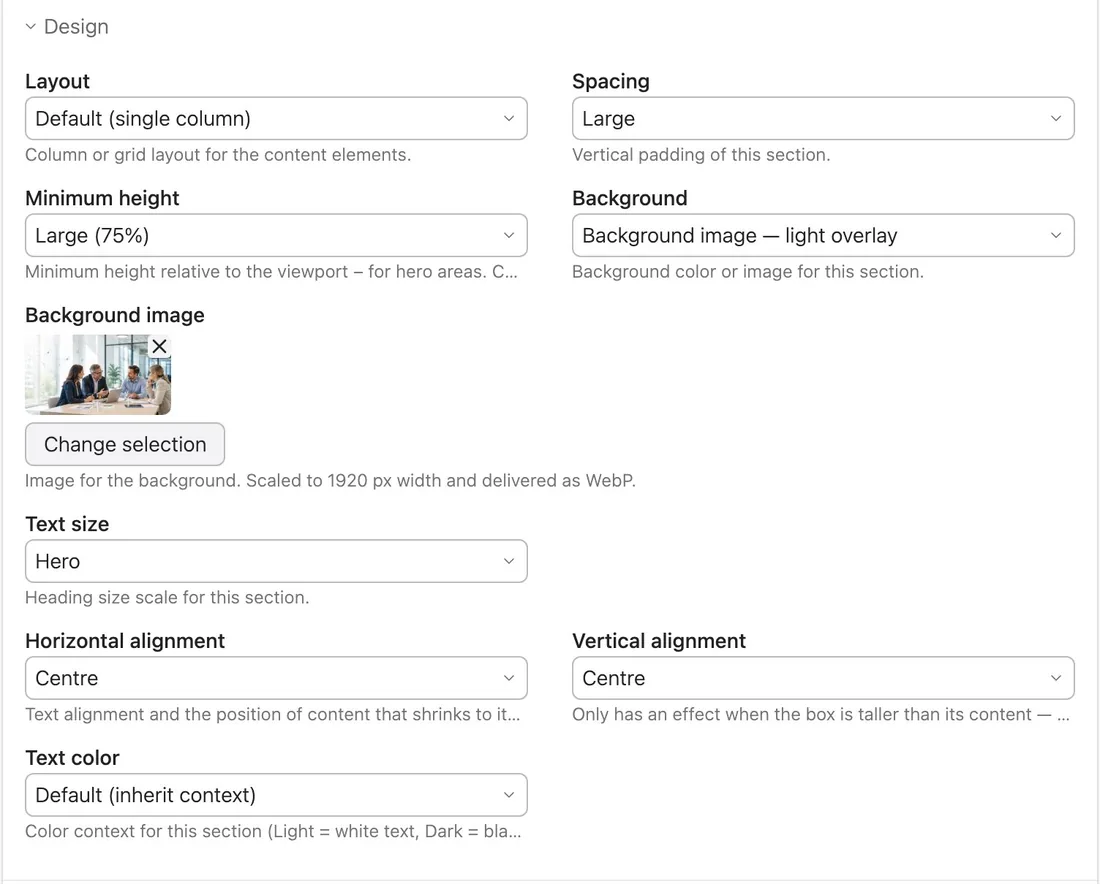
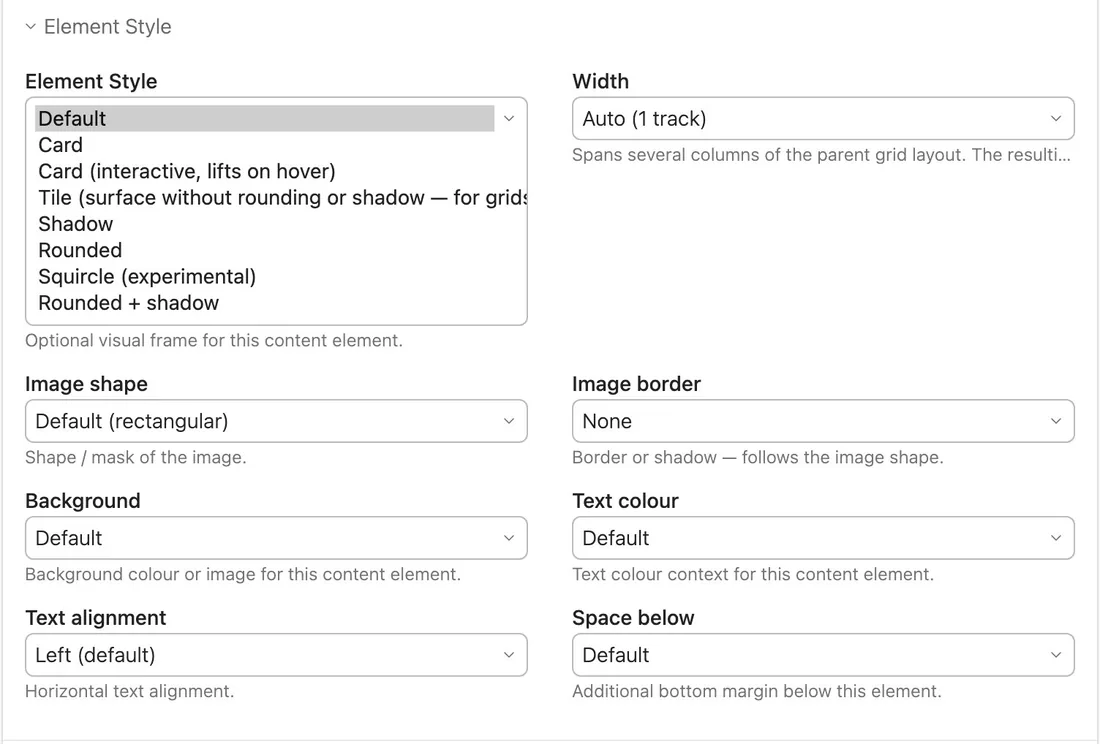
The “Design” panel on a Contao article: layout, background, minimum height, text colour and alignment as select menus. The “Element Style” panel on a single content element.

Levels 2 and 3

Your editors
don't need
CSS classes either.

Pages are still built from perfectly ordinary Contao building blocks — text, image, headline, accordion, slider. The theme sits on top and gives every block extra design fields. Nobody has to memorise a class or type into the CSS field.

Sections — the “Design” panelOn the article or element group: column layout, background including image and overlay, hero minimum height, text colour, alignment. Columns stack on narrow screens by themselves.

Content elements — the “Element Style” panelOn a single block: frame it as a card, give it a background, stretch it across several columns, choose an image shape, turn a hyperlink into a primary button.

Roles cleanly separatedEvery editor maintains sections and elements. Only logged-in administrators see the Design Studio — because a change there affects the whole website.


Under the hood

No Bootstrap. No jQuery.
No third-party extensions.

A theme that sits on a mammoth framework inherits its weight and its update cycle along with it. And every third-party extension you add for a single feature is a bet that it will still be maintained at the next Contao release. AVE takes neither bet.

34.3 KB of CSS over the wire in total, gzip: theme, starter blocks, Open Props and reset — one file
10.1 KB of own JavaScript, gzip. Six small files, no bundler
0 additional packages: the three the theme bundle requires already ship with Contao
0 third-party dependencies in the Design Studio

One library — and it doesn't tell you what to do

No Bootstrap, no Tailwind, no Foundation, no jQuery. Underneath is Open Props (7.5 KB gzip): 607 named values and a few keyframes — not a single component or utility class. It supplies numbers, not markup. Plus a 2.3 KB reset that sits at the very bottom of the cascade.

No third-party Contao extensions

No slider plugin, no layout builder, no form add-on. Everything AVE styles is one of Contao's own content elements. avando/ave requires PHP 8.3 and Contao 5.7 or 6 — otherwise only three packages that Contao brings anyway. Open Props sits in the bundle as a fixed copy, not as a live dependency: it can't change underneath you.

Only what's needed gets loaded

The lightbox (55 KB) only comes on pages that actually have a gallery. AVE doesn't ship Contao's own Swiper — it just colours it with the theme tokens.

Updates without regret

The framework lives in the bundle, your project customisations separately in custom.css and theme.css. An update doesn't overwrite them. Fewer dependencies means less that can break.

No build in daily work

Native CSS custom properties, no Sass, no preprocessor. The browser resolves at runtime. ave:css:build only combines the source files into one — you never need it while designing.

The Studio is optional

A separate add-on bundle. Without it, you set the same --av-* values by hand in theme-vars.css or custom.css. The theme still runs in full.

The @layer cascade

Declared once in tokens.css. Project overrides are unlayered and win against everything — regardless of selector specificity. You never have to fight the theme.

custom.cssunlayered — always wins
theme-vars.cssthe deltas from the Studio
av.animations
av.layout
av.theme
av.components
av.typography
av.base
av.tokensall --av-* defaults
av.normalize

Values that derive from each other

/* Secondary colour: from the primary, via two dials */
--av-color-secondary: oklch(from var(--av-color-primary) l
    calc(c * var(--av-sec-chroma))
    calc(h + var(--av-sec-hue-shift)));

/* Muted text: a mix of text and surface */
--av-color-text-muted: color-mix(in oklch,
    var(--av-color-text) var(--av-muted-fraction),
    var(--av-color-surface));

/* Move the whole radius ramp — instead of maintaining four steps */
--av-radius-scale: 1.4;

Change the primary colour and you automatically get the secondary colour, hover variants, muted text and the dark-mode values along with it. That's also why a language model only has to output a few numbers here to hit a consistent design — 254 named tokens, 136 utility classes, a finite action space instead of freely invented CSS.

Measured, not claimed

Top marks on Google PageSpeed.
With a full demo page.

The public demo — with a background video, a slider, a ticker and forty images — measured with Google PageSpeed Insights. 100 across the board on desktop, 99 for performance on mobile: with throttled mobile network and a four times slower CPU, the way Google emulates a mid-range phone.

PageSpeed Insights, mobile: Performance 99, Accessibility 100, Best Practices 100, SEO 100, Agentic Browsing 2 of 2.
PageSpeed Insights, desktop: Performance 100, Accessibility 100, Best Practices 100, SEO 100, Agentic Browsing 2 of 2.

Measured on 14 October 2026 on ave-demo.avandolabs.com, Lighthouse 13.5. Performance varies by a point or two between runs. Run it yourself ↗

One stylesheet, one request

Open Props, reset, theme and starter blocks ship as a single file: 34 KB gzipped. The values from the Design Studio sit right in the page head — no second round trip before the first paint.

The most important image first

The first section’s background image is preloaded, sized for the device. Every other image loads only when it comes close; a background video only once it is visible.

Nothing jumps

Layout shift 0: the space for the mobile menu is reserved before the script runs. Page transitions happen when you click around inside the site — arriving from elsewhere, you see the page straight away.

Avando AVE for Contao

Design as a setting,
not a rebuild.

For agencies and freelancers who build Contao sites for clients — and who no longer want to run the design round via staging copies and screenshot PDFs. And who want to use AI tools without giving up Contao.

Contao 5.7 and 6 · PHP 8.3+ · Design Studio as an optional add-on bundle · Licence terms